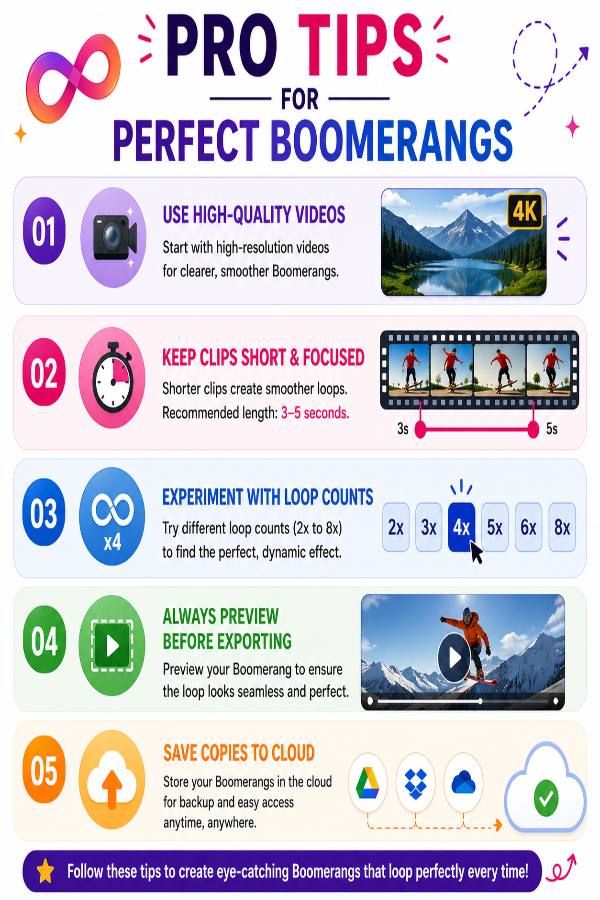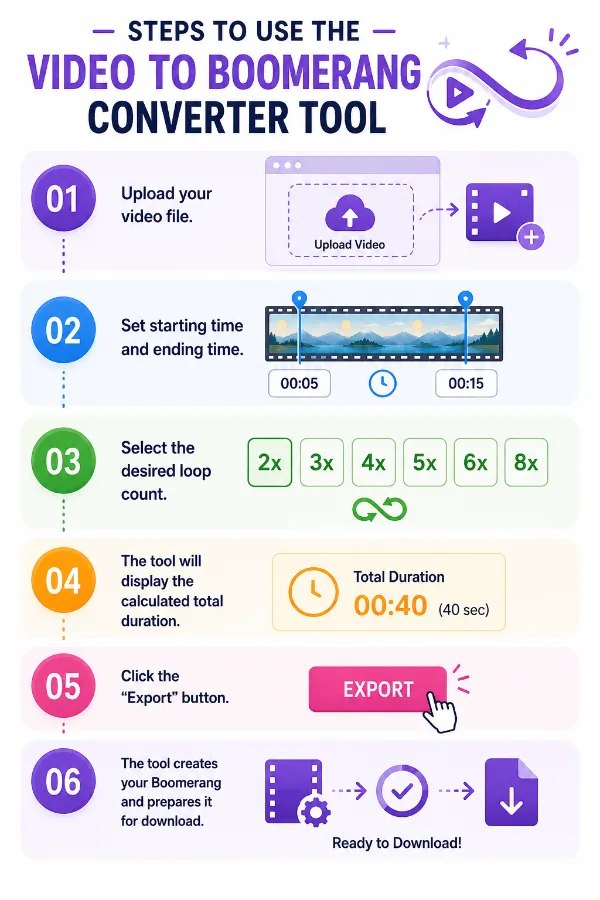





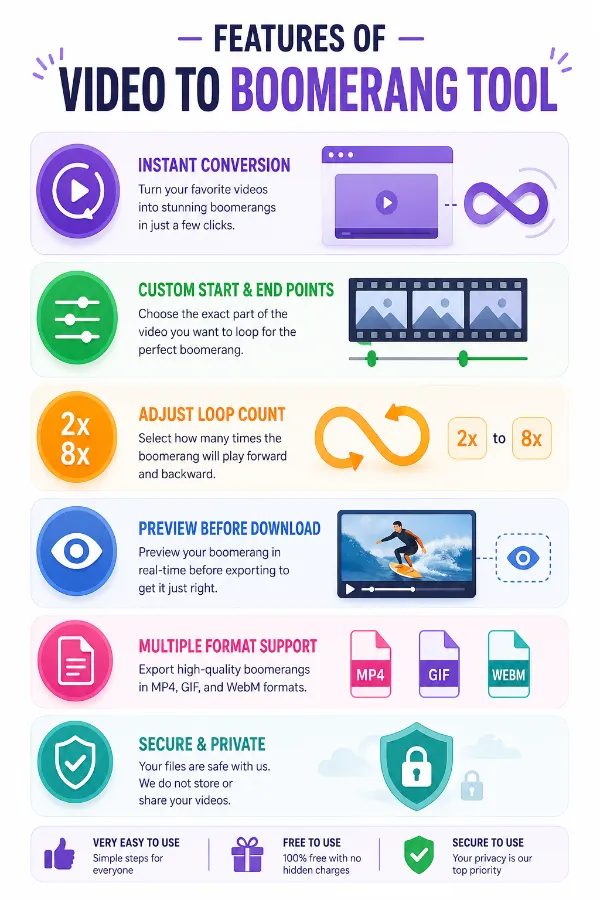
The program has an easy-to-use UI that is easy to understand and clear. Even if you've never edited a video before, you may easily generate beautiful boomerangs by learning the procedure fast.
Making an eye-catching boomerang from any video clip is made easier with the "convert video to boomerang" feature. You can add an interesting and dynamic effect to your video with a few clicks, making it ideal for storytelling and social networking.
You can adjust the loop length to suit your needs. With the help of this tool, you may change the duration to suit your creative idea, whether you want a longer, more flowing loop or a shorter, snappier bubble.
Once your boomerang is ready, download it instantly with just one click. The quick download feature saves time and gets your content ready for sharing immediately.
Even after turning your movie into a boomerang, keep its excellent quality. The tool ensures a polished end product by maintaining the quality and clarity of your video.
The video to boomerang feature is a browser-based tool. It eliminates the need for downloading or installation on any device with an internet connection. Therefore, you save a lot of time and space in storage, which can be very useful, especially when users frequently switch between devices. The no-installation approach gives maximum convenience and ease of use.
Other useful information
Explore our visual guides and infographics
Make your videos into boomerangs and loop
Frequently Asked Questions
A Boomerang video is a short video effect that plays a selected clip forward and then immediately plays it backward, creating a continuous looping animation. Boomerangs are widely used on social media platforms such as Instagram, Facebook, TikTok, and YouTube Shorts to create fun content. They are perfect for highlighting quick actions, reactions, or movements that look interesting when repeated.
Choose your video and upload it. Adjust the time and number of looping speed when you’re done, click on ‘Export’ and the clips will be downloaded.
Yes, our tool is compatible across various devices so you can use it on iPhone also.
The tool supports various video formats, including MP4, AVI, MOV, and more.
Yes, you can adjust the loop length to create a shorter or longer boomerang as desired.
No, the final boomerang videos will be free from any watermarks.
A boomerang video is characterized by its looping action, playing forward and then reversing, which creates a continuous and engaging motion effect.
Yes, the tool is suitable for both personal and professional use, helping you create high-quality boomerangs for marketing, social media, and more.
Yes, you can import videos directly from cloud storage services like Google Drive and Dropbox for conversion.
Yes, longer videos can be converted, but most tools require you to select a specific segment by setting start and end times. For very long videos, consider trimming them down first or splitting into smaller clips.
You can usually set these by dragging sliders along a video timeline or by entering specific timestamps. Previewing the selected segment helps ensure you’re capturing the right part before converting.
Looping repeats the selected video segment multiple times. For example, choosing 6x looping will play the clip six times in a row, creating a continuous, animated effect that looks lively and engaging.
The total duration depends on your selected clip length and loop count. For example, a 5-second clip with 4 loops will be approximately 20 seconds long. The tool typically displays this duration before you download.
A resolution of at least 720p is recommended for good quality. Higher resolutions like 1080p will produce clearer, more detailed Boomerangs, especially for larger displays.
Check that your video file is in the correct format and within size limits. Ensure a stable internet connection. If errors persist, try restarting the browser or device, or switch to a different browser.
Yes. Select the start and end times to choose the exact portion you want to convert into a Boomerang.
The tool maintains high output quality, although the final quality depends on the original video's resolution and compression.
After downloading, you can upload the Boomerang to supported social media platforms.
Yes, the tool supports HD videos to upload.
Boomerang videos make short clips more engaging by playing them forward and backward in a continuous loop. They are widely used for social media posts, sports highlights, funny moments, pet videos, travel memories, product showcases, and promotional content because the repeating motion naturally captures viewers' attention.
A looping video repeats from the beginning after it finishes playing. A Boomerang, however, plays the selected clip forward and then backward before repeating. This back-and-forth motion creates a smoother, more dynamic effect that is especially popular on social media.
Visit https://safevideokit.com/video-trimmer, which allows you to select specific segments of your video to cut or trim, making it easy to remove unwanted parts and focus on the content you want to keep..
Visit https://safevideokit.com/video-to-pdf to extract key frames or transcribe video content into a PDF format, ideal for creating summaries or documentation..
| Security | 100% (No files are sent to server for processing) |
| File size limits | None (No limit on size of files) |
| Usage limits | None (Process as many files as you want) |
| Price | Free |
| User Information Captured | None (We do not request for user information such as email / phone number) |
| Ads | None (We provide complete ad free experience) |
Over 200k Users Rely on Our Video Editing Tools Monthly
Join a growing community of users who rely on SafeVideoKit.com for secure, efficient, and easy-to-use video editing and processing tools. Enjoy privacy-focused features with no data uploads required.