




Bookmark this webpage

Online video montage maker

Create a montage with clips, transitions, and music.
Upload File
googledrive dropbox
or
drag and drop here
0 clips loaded
Drop photos or video clips here
or click to browse — .jpg .png .mp4 .webm .mov
0:00 / 0:00
Timeline
0:00 total
Add clip

Choose a Montage Template

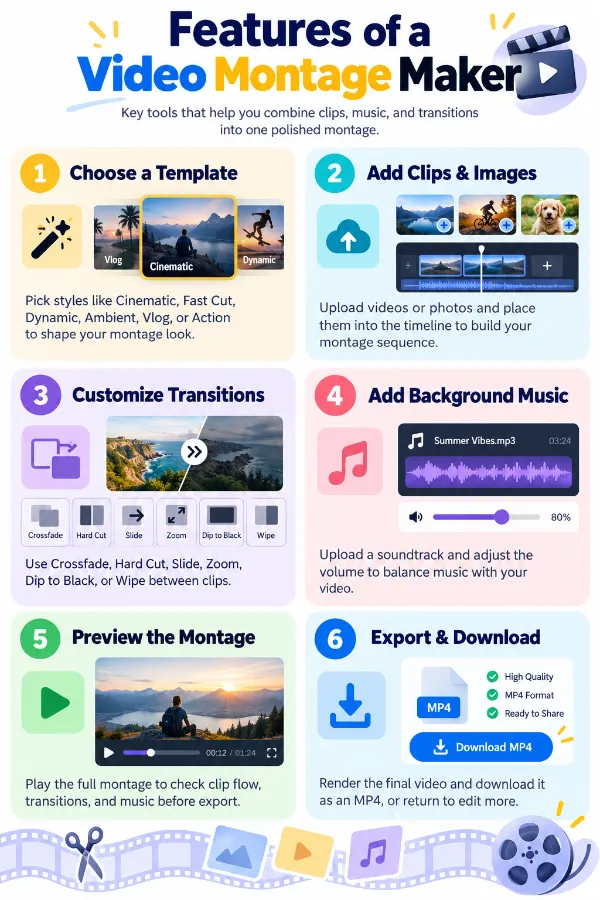
Select from montage styles such as Cinematic, Fast Cut, Dynamic, Ambient, Vlog, and Action to establish the overall editing style of your video. Each template provides a different feel for combining multiple clips into a single montage.

Add Multiple Clips or Images to the Timeline

Upload video clips or images directly from your device and add them to the montage. The tool automatically places the added clips into a timeline so you can preview how they work together as one video.

Customize Transitions Between Clips

Choose from Crossfade, Hard Cut, Slide, Zoom, Dip to Black, and Wipe to control how one clip changes into the next. You can click the node between two clips in the timeline to change the transition for that specific clip connection.

Add and Adjust Background Music

Upload your own audio track to use as background music for the montage. Adjust the music volume to make the soundtrack louder or quieter in relation to the video.

Preview the Complete Montage

Use the Play button to preview your clips, transitions, and background music before exporting. This gives you an opportunity to check how the montage flows and return to the editor if you want to make changes.

Export and Download the Montage

Click Export Video to process and render the completed montage. Once rendering is finished, you can download the montage as an MP4 file or return to the editor to make further changes.

idea

Steps to Use the Montage Maker

1 . Upload your clips or images from your device.
2 . Choose a montage template.
3 . Check the timeline and adjust individual transitions if needed.
4 . Upload a background music track and adjust its volume.
5 . Click Play to preview the montage.
6 . Click the Export button.
7 . Download the MP4 or return to the editor for further changes.

Other useful information

Explore our visual guides and infographics
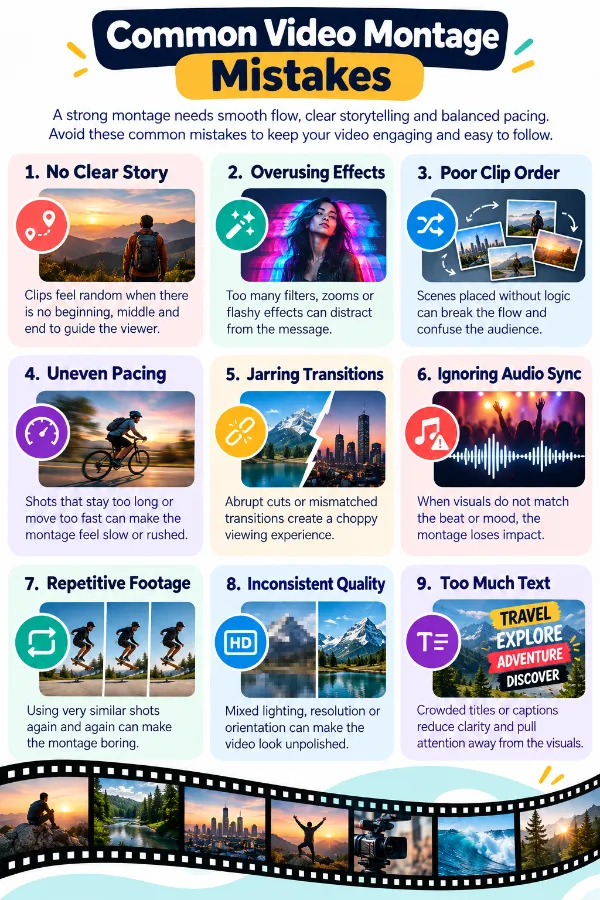
×
Infographic Preview

Frequently Asked Questions


What is an online montage maker?

An online montage maker is a browser-based tool for combining multiple video clips and images into one continuous video. Instead of arranging every element manually from scratch, you can use montage templates, transitions, music, and a timeline to create the finished video. It can be useful for creating highlight videos, travel montages, action compilations, event videos, vlogs, and other multi-clip projects.

Which montage template should I choose for my video?

Choose Cinematic for polished or film-like footage, Fast Cut or Dynamic for energetic clips, Ambient for calm or scenic content, Vlog for everyday or recording-session footage, and Action for sports, adventures, or fast-moving scenes.

What transitions can I use between clips?

The available transitions are crossfade, hard cut, slide, zoom, dip to black, and wipe. These let you change how one clip moves into the next.

Can I change the transition between individual clips?

Yes. Click the node between two clips in the timeline to select a transition for that specific connection. This lets you use different transitions throughout the same montage.

What is a crossfade transition?

Crossfade creates a gradual visual change from one clip to the next. It can be useful when you want a smoother transition rather than an abrupt change.

Can I replace the background music with my own audio?

Yes. Upload your own audio track and adjust its volume to use your preferred soundtrack instead of relying on the template's audio.

Can I add multiple video clips and images?

Yes. You can add multiple videos and images from your device, and the tool places them on the timeline so you can arrange them as a single montage.

Does the tool automatically create a timeline?

Yes. When you add your video clips or images, the tool automatically shows them on a timeline. This gives you a visual representation of the clip sequence and the transitions between them.

Can I preview my montage before exporting?

Yes. Click the Play button to preview the montage before exporting it. You can review the video and make further adjustments if something needs to be changed.

What format is the exported montage?

The completed montage can be downloaded as an MP4 video file.

Can I edit the montage again after exporting it?

Yes. If you want to make changes, return to the editor, adjust the montage, and export the updated version again.

What can I create with an online video montage maker?

You can combine multiple clips into videos such as travel montages, event highlights, vlog compilations, action videos, memory videos, and short highlight reels. The available templates and transitions let you choose a style that matches your footage.

Does the montage maker automatically arrange my clips?

The added videos and images appear on the timeline, giving you a visual sequence to work with. You can then adjust the montage using the available templates and transitions.

Can I create a montage without adding music?

Yes. You can create a montage without adding music.

How can I convert a video to PDF?

You can convert a video to PDF by capturing a screenshot or creating a visual summary of your video frames. Use our Video to PDF tool to generate PDFs from video frames easily. This is useful for creating visual reports or presentations from video content.

How can I trim or cut a video?

You can trim videos using our Video Trimmer or MP4 Cutter. Upload your video, select the start and end points, and download the trimmed video.

Our USPs

Security 100% (No files are sent to server for processing)
File size limits None (No limit on size of files)
Usage limits None (Process as many files as you want)
Price Free
User Information Captured None (We do not request for user information such as email / phone number)
Ads None (We provide complete ad free experience)

Over 200k Users Rely on Our Video Editing Tools Monthly

Join a growing community of users who rely on SafeVideoKit.com for secure, efficient, and easy-to-use video editing and processing tools. Enjoy privacy-focused features with no data uploads required.

×
Share on social media to continue using this website
rating-img

Rate this tool

Your feedback helps us improve our services

5.00/5   2 votes

About The Author

Harsh Kumar

Hey there! I'm Harsh Kumar, a dedicated technology enthusiast with a strong passion for music and anime. I tackle challenges head-on and consistently strive for excellence. In my past time, you can find me indulging in my favorite tunes or exploring captivating anime worlds.

Contributors