# Boomerang Maker: Create Smooth Video Loops for Free
Ever recorded a perfect moment and wished you could make it play over and over?
Maybe it’s a friend jumping into a swimming pool, someone blowing out birthday candles, a quick dance move, or even your dog catching a ball. Some moments are just too good to watch once.
That’s where boomerang videos come in.
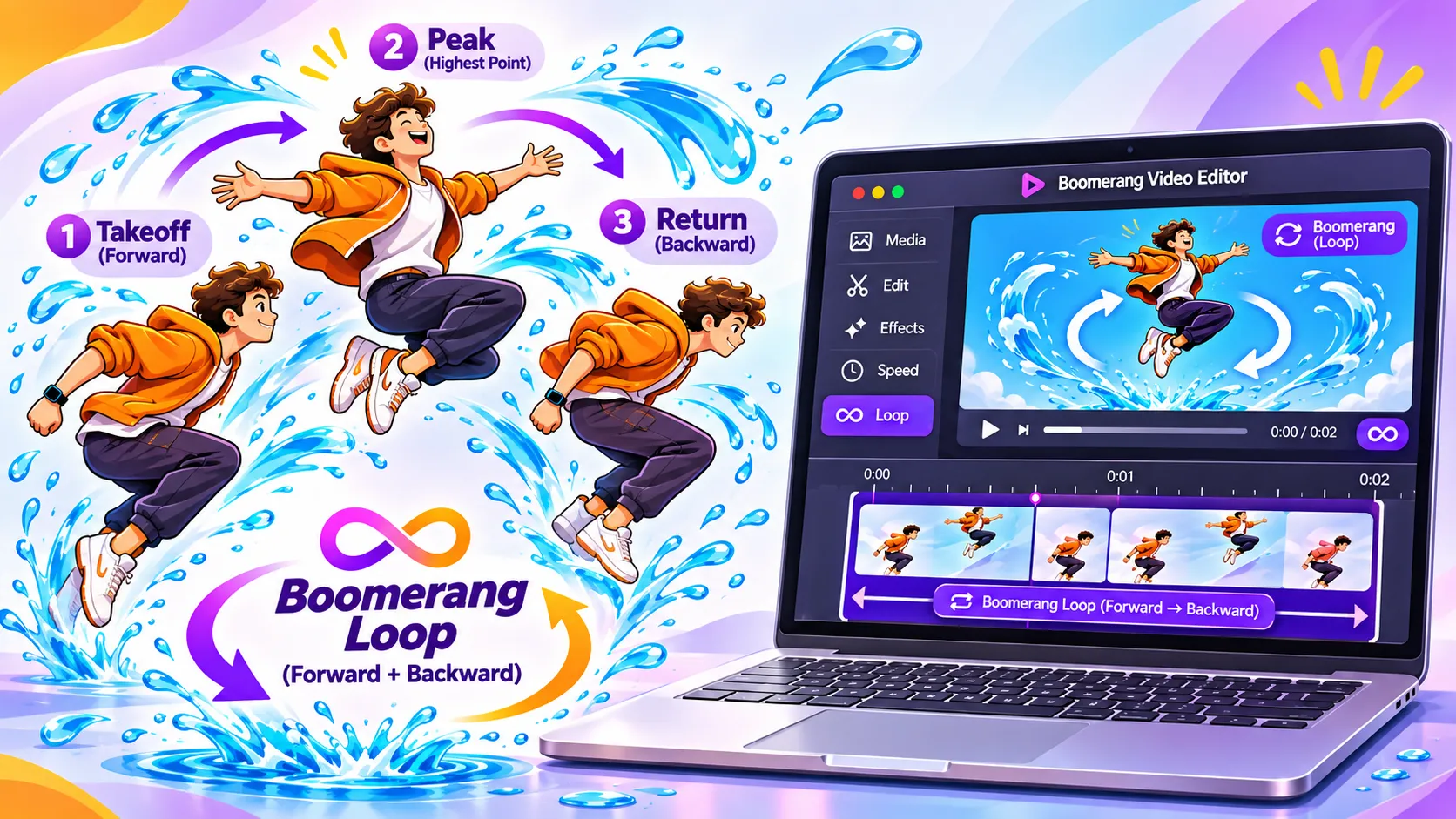
A boomerang takes a short video clip, plays it forward, and then reverses the movement. The result is a fun back-and-forth effect that makes ordinary actions more interesting.
You’ve probably seen these videos on Instagram and other social media platforms.
The good news is that you don’t need expensive video editing software or professional skills to make one.
With SafeVideoKit’s Boomerang Video Maker, you can turn an existing video into a repeating forward-and-reverse clip, adjust its speed, choose how many times it repeats, and download the result.
And according to SafeVideoKit’s tool description, you can do this for free without a forced watermark.
This guide explains how boomerang videos work, what makes a good loop, and how to create one using SafeVideoKit.
What Is a Boomerang Video?
A boomerang video is a short clip that plays forward and then backward, creating a repeating movement.
Imagine recording someone tossing their hair, waving at the camera, or jumping into the air.
Instead of playing the recording once and stopping, a boomerang reverses the action and plays it again.
The person jumps up, comes back down in reverse, and repeats the same movement.
That’s what gives boomerang videos their playful appearance.
How is a boomerang different from a regular video loop?
A regular video loop simply starts playing again when it reaches the end.
A boomerang reverses the action before repeating.
Here’s a simple comparison:
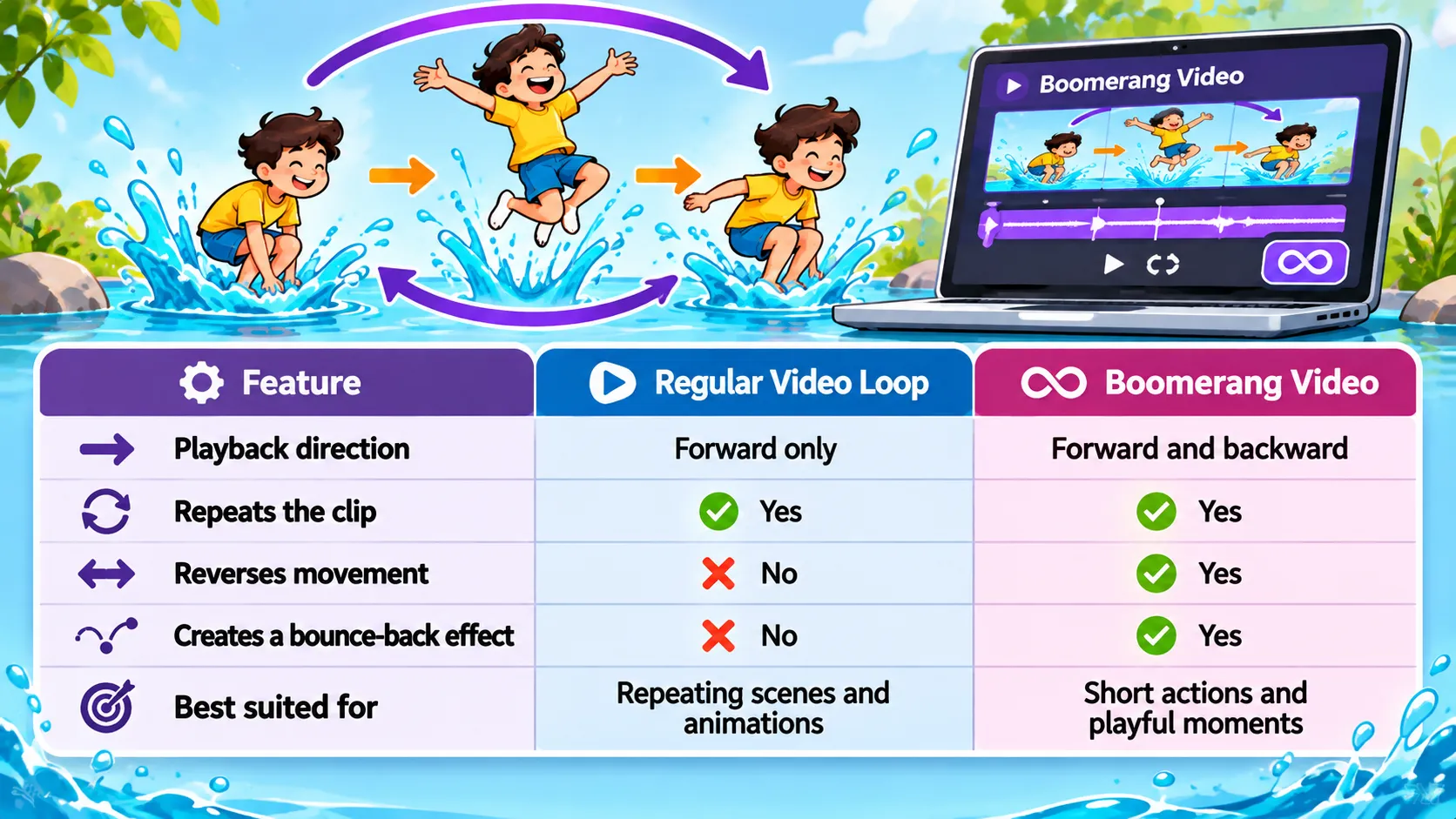
For example, if someone waves at the camera, a normal loop repeats the wave from the beginning.
A boomerang makes the hand move forward and backward continuously.
It’s a small difference, but it can completely change how the video feels.
What Makes a Good Online Boomerang Video Maker?
There are plenty of video editing tools available online, but not all of them create the same boomerang effect.
Some simply repeat your original video. Others offer controls that let you choose the exact movement, playback speed, and number of repetitions.
If you’re looking for an online boomerang maker, here are a few features worth considering.
1. Proper Forward-and-Reverse Playback
This is the most important feature.
A genuine boomerang should play a selected action forward and then reverse it.
If a tool only repeats the original clip from the beginning, you’re creating a regular loop rather than a boomerang.
Look for a video editor that supports actual reverse playback.
2. Accurate Timeline Controls
Not every second of your recording needs to be included.
Let’s say you’ve recorded a ten-second video, but the interesting movement happens between the fourth and sixth seconds.
A good boomerang maker should let you select those two seconds rather than forcing you to use the entire clip.
This helps keep the final video short and focused.
3. Different Looping Styles
Some movements look better when they reverse smoothly.
Others benefit from a slightly more noticeable bounce at the turning point.
Having different playback modes gives you more flexibility.
4. Adjustable Speed and Repetitions
A fast boomerang can make a simple movement feel energetic.
A slower version might work better for a gentle hand gesture or flowing fabric.
Being able to adjust the number of repetitions is useful, too.
5. Simple Export Options
Once you’ve finished editing, downloading the video should be straightforward.
Before choosing a tool, check whether it adds a watermark, charges for downloads, or limits the available output settings.
You should also check how the platform handles your uploaded videos if you’re working with personal footage.
Create Boomerang Videos with SafeVideoKit
You don’t need a complicated video editor just to make a short clip repeat.
SafeVideoKit’s Video to Boomerang tool is designed for that specific task.
You can choose a section of your existing video, apply a forward-and-reverse effect, and adjust the result before downloading it.
The tool offers several useful controls.
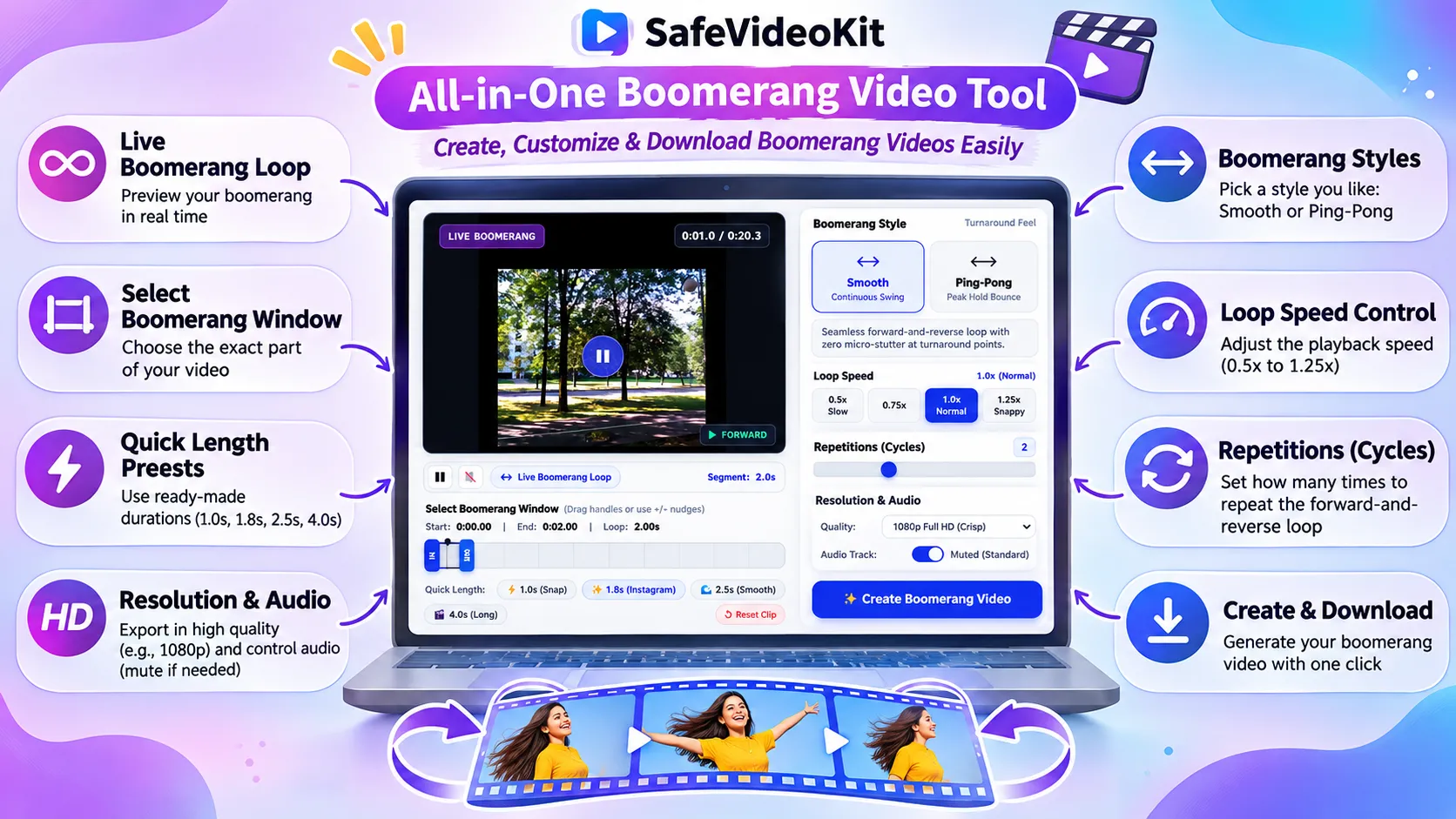
Smooth and Ping-Pong Boomerang Modes
Different movements need different kinds of timing.
SafeVideoKit offers two playback styles.
Smooth Mode
Smooth mode plays the selected video forward and then backward without an intentional pause at the turning point.
It’s useful for movements that look better when they flow continuously.
For example, a person gently waving a hand or moving a piece of fabric may look more natural with a smooth reversal.
Ping-Pong Mode
Ping-Pong mode creates a more noticeable back-and-forth effect, with a brief hold at the ends of the movement.
This can work well for playful gestures, jumps, and actions where you want the reversal to stand out.
Neither mode is automatically better.
Try both and see which one suits your recording.
Adjust the Loop Speed
Sometimes a video looks better when it plays a little faster.
Other times, slowing things down makes the movement more noticeable.
SafeVideoKit includes a loop-speed control that lets you experiment with the timing.
For example:
- A quick hand wave might look more energetic at a faster speed.
- A gentle spinning movement might look better when slowed down.
- A playful jump might benefit from a more noticeable bounce-back effect.
The best speed depends on the original movement.
Start with the default setting and adjust it until the action looks natural.
Choose How Many Times the Video Repeats
A boomerang doesn’t need to repeat forever.
Sometimes, two or three cycles are enough to create the effect you want.
SafeVideoKit’s Cycles setting lets you choose how many times the selected movement repeats.
This is useful when preparing videos for different purposes.
A short loop might be enough for a quick social media post, while a longer sequence could work better for a creative project.
Just remember that adding more cycles also makes the finished video longer.
Select the Exact Part of Your Video
One of the easiest ways to improve a boomerang is to remove unnecessary footage.
Imagine you’ve recorded someone jumping.
The recording starts with the person getting ready, then they jump, and finally they walk away.
You probably only want the actual jump.
With SafeVideoKit’s timeline controls, you can select the start and end points of that movement.
This makes the final clip more focused and helps the reversal feel more natural.
Adjust Resolution and Audio
Different videos have different requirements.
A clip you’re sending to a friend might not need the same output resolution as one you’re preparing for a larger display.
SafeVideoKit includes resolution settings so you can configure your final video.
It also provides audio controls, allowing you to manage sound according to the options available in the tool.
Before exporting, it’s worth checking that the settings match how you plan to use the video.
Check the Estimated Video Size
SafeVideoKit also displays information about the original file size and estimated output.
This can be helpful when you’re trying to create a smaller clip for messaging or social media.
The final file size can depend on factors such as resolution, duration, and the number of repetition cycles.
An estimate gives you a useful idea before you generate the finished video.
Download Without a Watermark
Nobody wants to spend time editing a video only to discover that a large watermark has been added to the result.
According to SafeVideoKit’s published tool description, its Boomerang Video Maker offers free, watermark-free MP4 output without a separate per-video export fee.
This makes it worth considering if you only need a simple boomerang effect and don’t want to pay for an advanced video editing application.
Why Pay ₹99 for a Simple Boomerang Video?
Not every video editing task requires a paid subscription.
If your goal is to turn an existing video into a short forward-and-reverse loop, a dedicated browser-based tool may be enough.
Some editing applications offer paid plans because they include advanced features such as multi-track timelines, AI-generated effects, and professional export settings.
Those features can be useful, but you might not need them for a ten-second boomerang.
Before paying for a video editor, think about what you’re actually trying to create.
Do you need to add complex visual effects, combine multiple recordings, or work with several audio tracks?
Or do you simply want to choose a short movement, reverse it, repeat it, and download the final video?
For the second option, SafeVideoKit offers a straightforward alternative.
With its free online Boomerang Video Maker, you can explore Smooth and Ping-Pong modes, adjust playback speed, control repetition cycles, and prepare an MP4 output.
The important thing isn’t choosing the tool with the most features.
It’s choosing one that does what you need without adding unnecessary complications.
How to Make a Boomerang Video Online for Free
Creating a boomerang doesn’t have to take much effort.
If you already have a short video on your phone or computer, you can use SafeVideoKit to turn it into a repeating clip.
Here’s how.
Step 1: Open the Boomerang Video Maker
Visit the SafeVideoKit Video to Boomerang page in your browser.
You don’t need to install professional desktop video editing software.
Step 2: Select Your Video
Choose the video you want to turn into a boomerang.
This could be a dance move, a birthday moment, a jump, or any other short action.
Once the video loads, you can review the source file information.
Step 3: Choose the Part You Want to Repeat
Use the timeline controls to select the beginning and ending of your clip.
Try to focus on one clear movement.
For example, if someone is jumping, select the part where they leave the ground and return.
Avoid including too much footage before or after the action.
Step 4: Select Smooth or Ping-Pong Mode
Choose the playback effect that works best for your video.
Use Smooth mode for continuous motion or Ping-Pong mode when you want a more noticeable bounce.
You can experiment with both styles before deciding.
Step 5: Adjust the Speed and Repetitions
Now choose how quickly the movement should play and how many times it should repeat.
A short clip with a few cycles is often enough.
You can also review the available resolution and audio settings.
Step 6: Create Your Boomerang
Once you’re happy with the settings, generate the boomerang video.
Preview the result to make sure the movement reverses at the right moment.
If the transition feels awkward, go back and adjust the selected segment.
Step 7: Download Your Video
When the boomerang looks right, download the MP4 file.
You can then save it to your device, share it with friends, or use it in another video project.
Tips for Making Better Boomerang Videos
The tool you use matters, but the original footage matters just as much.
A well-chosen movement can make a simple boomerang look far more interesting than a long clip filled with unrelated actions.
Here are a few tips to help you get better results.
1. Choose a Short, Clear Movement
Boomerangs work best when the action is easy to recognise.
A person jumping, a hand waving, or a ball bouncing can create a strong effect.
Try to avoid clips where several unrelated things happen at once.
The simpler the movement, the easier it is to create a satisfying loop.
2. Find the Right Start and End Points
Good timing makes a big difference.
If you reverse the video at an awkward moment, the movement may look unnatural.
For example, cutting a jump halfway through the action might make the reversal feel sudden.
Try adjusting the timeline until the movement flows comfortably in both directions.
3. Experiment with Both Playback Modes
Don’t assume that one mode will work for every recording.
A smooth reversal might look great for flowing fabric or gentle movement.
Ping-Pong mode might suit a quick gesture or playful action.
Try both and compare the results.
4. Don’t Add Too Many Repetitions
It can be tempting to make your boomerang repeat as many times as possible.
But longer isn’t always better.
A few cycles are often enough to make the effect noticeable without making the video feel repetitive.
Start with a lower number and increase it only if the clip needs more time.
5. Pay Attention to Video Quality
If the original video is blurry or poorly lit, the boomerang won’t automatically fix those problems.
Try using footage with clear movement and good lighting.
Also, consider the output resolution when you’re preparing the video for sharing.
6. Preview Before Downloading
Always watch the finished boomerang before saving it.
Check whether the reversal looks natural, the speed feels right, and the number of repetitions works for your clip.
A small change to the start or end point can make a surprising difference.
Are Online Boomerang Video Makers Private?
When you’re editing personal videos, privacy is worth considering.
Maybe you’re creating a boomerang from a family celebration, a child’s birthday, or a moment recorded inside your home.
You might not want to send the original recording to an unfamiliar remote processing service just to create a short loop.
SafeVideoKit describes its Boomerang Video Maker as a browser-based tool that processes footage locally.
According to the supplied tool information, the original video isn’t uploaded to a SafeVideoKit processing server for the boomerang operation.
This can reduce the need to transfer your personal footage to a remote editing service.
Where Can You Use Boomerang Videos?
Boomerangs aren’t limited to one social media platform.
You can use them anywhere a short, repeating video makes sense, provided the destination supports the exported format.
Here are a few ideas.
Instagram Stories and Reels
Boomerangs are popular for quick, playful moments.
You might create one from a dance move, a celebration, or a small everyday action.
Birthday and Celebration Videos
A short clip of someone blowing out candles, tossing confetti, or waving at the camera can become a fun boomerang.
You can save it as part of a birthday montage or share it with family.
Travel Memories
A splash at the beach, a jump in front of a scenic view, or a playful moment during a holiday can work well as a repeating clip.
Product and Creative Videos
Boomerangs can also be useful for showing small product movements.
For example, rotating an item or highlighting a simple action can make a short promotional video more engaging.
Personal Messages
Sometimes, a quick wave or playful gesture is enough to create a memorable video message.
You don’t always need music, transitions, or complicated editing.
A well-timed boomerang can do the job.
Conclusion
Boomerang videos are a simple way to make everyday moments more fun.
Whether you’re capturing a quick jump, a birthday celebration, a dance move, or something playful, a short forward-and-reverse loop can make an ordinary clip more memorable.
And creating one doesn’t need to be complicated.
With SafeVideoKit’s Boomerang Video Maker, you can select the exact part of your video, choose between Smooth and Ping-Pong modes, adjust the speed, control the number of repetitions, and prepare your finished MP4.
You don’t need advanced editing experience to get started.
Choose a clear movement, experiment with the settings, and preview the result before downloading.
Ready to try it? Create a free boomerang video with SafeVideoKit.